
Parted Magic Password Reset: Reset a Forgotten Linux Password
Parted Magic Password Reset sets or clears the password of an account on an installed Linux system, without starting that system. Use it when the password to a Linux computer is lost. For a Windows password, use Change Windows Password, right next to it in the System menu.
Password Reset is part of Parted Magic. It is in the System menu. Like the other Parted Magic tools, it runs from the same USB drive.
Password Reset Video Walkthrough
On This Page
- Step by step
- How it changes the password
- Encrypted systems
- Set or clear
- What it cannot do
- In a terminal
- The log
Step by Step
- Start the computer from Parted Magic and open Password Reset from the System menu. It finds every installed Linux system on every drive, including systems on LVM and Btrfs.
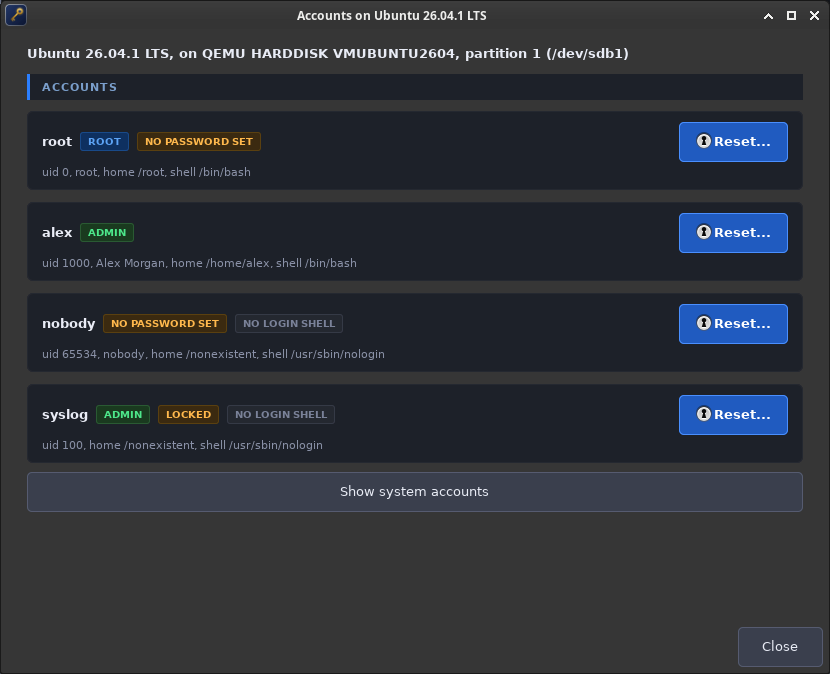
- Click Accounts on the system. It lists the accounts, with labels for administrators, locked accounts and accounts with no password.
- Click Reset on the account and type the new password twice.
- The result lists each step. Restart the computer without Parted Magic and log in with the new password.
How It Changes the Password
A Linux account’s password is kept as a hash in /etc/shadow on the installed system. Password Reset finds the installed systems with Parted Magic Boot Repair’s own search, which reads ext2, ext3, ext4, XFS, Btrfs, F2FS, JFS and ReiserFS roots, Btrfs subvolumes, and LUKS and LVM layers. It reads the accounts and changes the one you pick, in one of two ways, the first whenever it can:
- The system’s own tools. It mounts the installed system and runs that system’s own passwd and chpasswd inside it. The new password is written by the system’s own libraries, in the method the system is set up for, so it is always in a form that system accepts, and the file keeps its SELinux label.
- A direct write. If the system’s own tools will not run, you can turn on a direct write to
/etc/shadow. Password Reset builds a hash in the format already in the file. On an SELinux system it cannot relabel the file from Parted Magic, so it asks the system to relabel at its next start.
When it resets a password, it also unlocks the account and clears any expiry, so the account can log in. You can turn that off.
Encrypted Systems
A system inside a LUKS volume is found once the volume is unlocked with its passphrase. In the window, use the Unlock button under Encrypted Volumes. In a terminal, --list and --reset ask for the passphrase. The passphrase is kept in memory only and is never written down.
Set or Clear
You can set a new password, or clear it so the account logs in with no password. A graphical login screen may refuse a blank password, so clearing it is best for reaching a text login.
What It Cannot Do
Some accounts are not kept in /etc/shadow, or depend on the old password:
- systemd-homed accounts keep the password in the user’s home record. Reset one from the installed system itself.
- An encrypted home folder (ecryptfs or fscrypt) and the login keyring are unlocked by the login password. Changing the password without the old one locks that home folder and that keyring. Password Reset warns before it acts.
- Image-based systems, such as Fedora Silverblue (ostree) and NixOS, manage
/etcthemselves, so a password set here may not carry over after an update or a rebuild. - A ZFS root is not supported yet.
In a Terminal
pmagic_passwd --list            # the systems and their accounts (add --all for system accounts)
pmagic_passwd --reset [N[:USER]]  # reset a password: asks for the system, the account and the password
pmagic_passwd --check-deps      # check the programs it needs
The new password is typed when it is asked for, never on the command line.
The Log
Each reset writes a log in /home/partedmagic that names the system, the account and each step. The password is never written to the log.
Get Parted Magic Password Reset
Parted Magic Password Reset comes with Parted Magic, along with Parted Magic Boot Repair, VisParted, Clone and Secure Erase. One price covers unlimited disks and unlimited computers.