Parted Magic Rescue: Deleted Files Come Back With Their Names
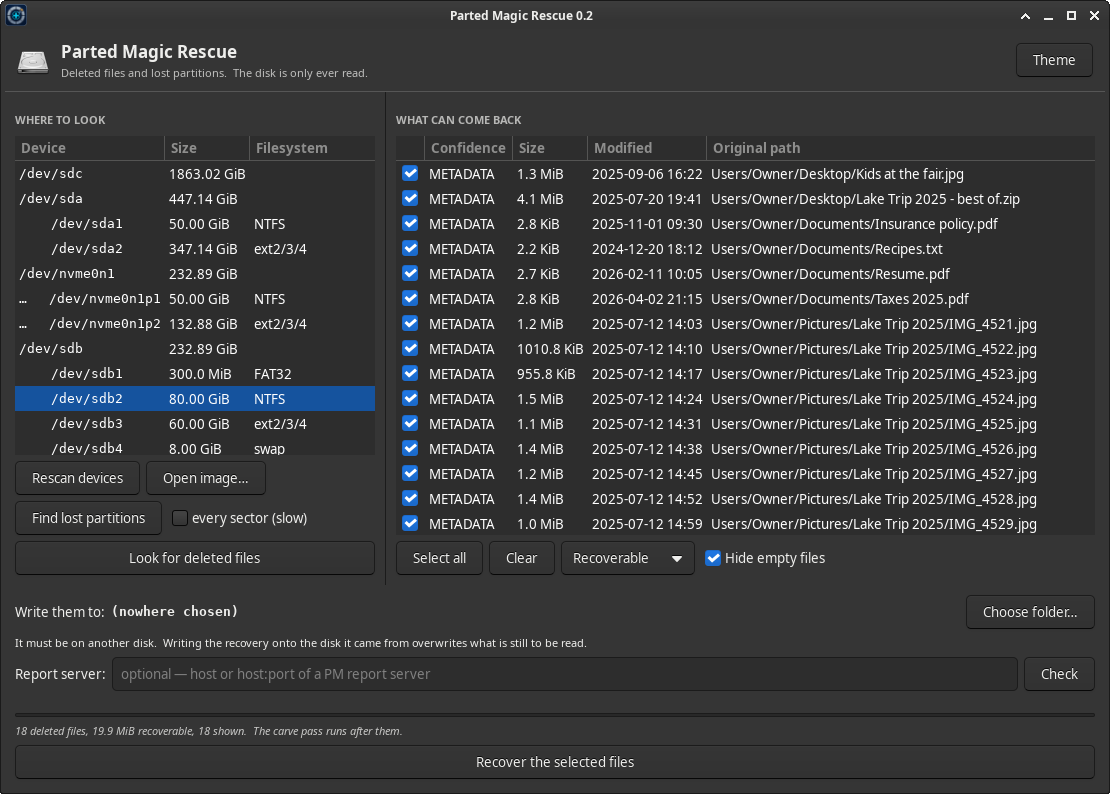
Rescue recovers deleted files and finds lost partitions, and it never writes to the disk it is reading. Files come back the way they were — their real names, their folders and their dates — and each one carries a statement of how sure Rescue is of it.
It ships inside Parted Magic, and it runs from the same USB stick as everything else.
On This Page
- The one rule: the disk is never written
- Deleted files, with their names
- How sure it is
- The carve pass
- Lost partitions
- Encrypted volumes
- A filesystem cut short
- Where it writes, and the recovery report
- One program, three faces
- Command-line reference
- What Rescue will not do
- Rescue FAQ
The One Rule: The Disk Is Never Written
The disk you are recovering from is opened read-only, and nothing is ever written to it. The files go to a folder somewhere else: not on that disk, not on a partition of it, and not on an LVM volume, a btrfs or a loop-mounted image that lives on it. Rescue refuses a folder that is, because writing the recovery onto the disk it came from overwrites what is still to be read.
The same goes for you. The moment you notice files are missing, stop using that disk: anything written to it can land on the space a deleted file still occupies. Boot Parted Magic from its USB stick and work from there.
Deleted Files, With Their Names
Rescue reads the filesystem’s own records first. A deletion usually leaves far more behind than the file’s contents, and what survives decides what comes back. NTFS, exFAT, FAT12/16/32 and ext2/3/4 are all read.
| Filesystem | What a deletion leaves | What comes back |
|---|---|---|
| NTFS | The file’s record keeps its name, full path, timestamps and the map of its data. | The file, exact, even when it is fragmented. NTFS-compressed files are unpacked. |
| exFAT | Deletion clears one bit per entry, and the name survives whole. | A contiguous file, which is most of them, comes back exact. |
| FAT12 / FAT16 / FAT32 | The cluster chain is zeroed, and the short name loses its first character. | The real name in full when the file had a long name (otherwise the lost character shows as ?), and the file whenever it was contiguous and its clusters are still free — the usual case on a camera card. |
| ext4 | The file’s map and its directory entry are both emptied, name and all. | Both are taken from the journal, whose older copies still hold the name and the map. Heavy writing after the deletion overwrites that evidence, so stop using the filesystem. |
| ext2 | There is no journal. The name survives, but not where the file was. | The file is named but not located, and left to the carve pass. |
On ext4 the journal is read block by block rather than followed from its start, because a clean unmount leaves the journal saying it is empty while every block is still there. A name is matched to the copy of its file from while that name was in use, so a file renamed before it was deleted comes back once, under its last name.
Files with no name
A file that comes back as mft-NNNNNNNN is the reverse case: the deletion destroyed its name and left everything else, so its contents, its size and its timestamps are exact. Rescue adds the right extension by reading what the file actually is, so a photograph comes back as mft-00000031.jpg.
This is not a rare corner. On Linux it is what the kernel’s own NTFS driver does to every file it deletes, while ntfs-3g and Windows keep the name. So on NTFS, which driver did the deleting decides whether you get names — and either way you get the files. For a volume Windows deleted from, --index-names also looks for a lost name in its directory’s index.
How Sure It Is
Every file is listed with a confidence grade, and the grade is something Rescue will stand behind:
| Grade | What it means |
|---|---|
| METADATA | Located from surviving metadata, with every cluster verified still free: nothing has taken the file’s space. If the drive then fails to read part of it while it is written out, it drops to PARTIAL, and the manifest says how much is missing. |
| PARTIAL | Located, but some of its space was used again, part of its map is missing, the drive would not read it, or part of it lies past the end of a filesystem cut short. The manifest names what is wrong with each one. |
| UNREADABLE | Found, but the content cannot be produced: Windows EFS encryption, whose key is in the Windows user’s profile, a file that lies wholly past the end of a filesystem cut short, or a file deleted before any of it was written to the disk. |
| NOMETA | Found by name only; where its data was did not survive. The carve pass is what reaches these. |
| ZEROED | Every byte reads back as zero. On an SSD, Windows asks the drive to discard a deleted file’s space (TRIM), and it reads as zeros from then on. Nothing of the file is left, so nothing is written, and the manifest says so. |
Two deleted files can claim the same space. The one written later holds it. Where the files’ own times settle which that was, it is graded on its merits and the other is told what overwrote it; where they do not, both are PARTIAL.
On FAT the deletion erases the cluster chain, so a file longer than one cluster is assumed to be in one piece and stays PARTIAL until something shows it was. As each file is written, its own format is asked: a JPEG, PNG, GIF, ZIP (and the documents built on it), PDF or gzip whose end is found in its last cluster, or an MP4 or MOV whose structure runs to its last cluster, was in one piece and is written as METADATA. A format with no end to find — TIFF and camera raws, WAV, AVI, plain text — stays PARTIAL, with that reason.
The Carve Pass
After the files the filesystem still remembers, whatever is left is carved: files recognized from their own bytes, with no name to go on. The carve pass runs only over space no live file owns — free space, plus anything still marked in use that nothing reaches any more, which is what a wiped folder leaves behind — and it skips what already came back by name. So it is small, it is fast, and it never hands back a nameless second copy of a file that came back with its path.
Where a format states its own length, the file is cut exactly: PNG, GIF, ZIP and its whole family, RIFF, MOV/MP4/HEIC, BMP, SQLite, gzip, 7z, PDF, TIFF and its raw descendants, and JPEG by its end marker. Where it does not, the extract runs to where the next file begins, never past a cap, and the manifest says so.
Carved files are named from what rides inside them: a photograph under the day it was taken, a PDF under its creation date, and a zip under what it really is — .docx, .xlsx, .odt, .apk, .epub — read from its list of contents. Everything is hashed by content, so the same bytes are never written twice.
A memory card that was formatted has no deleted names left at all, and the carve pass is how its photographs come back. In the window and the terminal, Rescue offers it on its own when nothing is listed. For a volume whose header or partition table is gone, --raw ignores the filesystem and carves the whole device.
Lost Partitions
NTFS, exFAT, FAT and ext each state their own length in their header, so a header that reads correctly gives a partition’s start and its end. Each find is then checked against its own backup copy — NTFS’s backup boot sector, exFAT’s backup boot region, FAT32’s backup sector, ext’s backup superblock — and a find both copies agree on is reported as confirmed rather than as a guess.
The search runs on 1 MiB boundaries, which is where anything laid down this century starts. Searching every sector, in the window’s every sector (slow) box or with --deep, also finds partitions an older tool aligned to cylinders, and reads the whole disk to do it.
The safe way to use the result is not to write a table at all. Any partition Rescue finds can be read where it lies and its files recovered, without one byte of the disk changing:
rescue partitions /dev/sdX                        # where the lost partitions are
rescue scan /dev/sdX --at START                   # read one where it lies
rescue recover /dev/sdX --at START --out DIR      # and recover its files
To put the partitions back into the table, Find lost partitions in the window offers Put back with VisParted. Tick the finds to restore — a confirmed find is ticked for you, and a header alone is offered but not chosen, because it can be the ghost of an earlier layout — and VisParted opens with the plan, which is the confirmation. A disk with no table asks GPT or MBR, with nothing chosen for you.
VisParted writes only the table entries, where the partitions lie, and not one byte inside them. Its plan reads the filesystem at each place and refuses if it is not the one found, and it hashes the first and last megabyte of every partition when the plan is made, again before anything is written, and again after. A partition the table still lists is kept by its number, so a table that lost one entry of four gets that one back and keeps the rest.
Before anything touches a disk, rescue table-backup saves its first and last megabyte, the table read out as JSON, and the layout in the form VisParted reads, so a saved table can be put back without writing inside any partition.
Encrypted Volumes
A BitLocker or LUKS volume is read through its unlock. Unlock it in Parted Magic’s Mount window, choose the partition itself, and Rescue reads it through the unlock and says so. A locked one is named, with how to unlock it.
Through an unlock, the encrypted partition is read alongside. A stretch that is zeros there was discarded by the drive or never written, and decrypted it would be noise, so a file an SSD discarded is ZEROED rather than noise passed off as exact.
BitLocker records when it was turned on, and a deleted file older than that is looked at twice. Encrypting “used space only” leaves free space as it was, so such a file can still lie there unencrypted. Encrypting the whole volume fills its free space instead, and a file deleted before that is gone: it is reported, and not written. The lost-partition search finds BitLocker volumes too, with the size BitLocker records, and puts them back as BitLocker volumes.
A Filesystem Cut Short
A filesystem can be longer than what holds it: a disk image ddrescue had not finished when the drive died, a drive behind an enclosure that reports less than it holds, a partition shorter than the filesystem in it. Rescue reads it for what is there and says how much is missing. A file that lies wholly past the end is listed, with its name and size, as UNREADABLE; one that runs past the end comes back PARTIAL, with zeros where the rest would be, and the manifest says how much.
Where It Writes, and the Recovery Report
Each file is written under a temporary name and takes its own name only once it is complete, so a destination that fills up or a run that is stopped never leaves a cut-off file looking recovered. Nothing already in the folder is overwritten: a name that is taken gets a numbered twin, and a file that already holds exactly the same bytes is left alone, so running it again after the destination filled up finishes the job. Files are streamed rather than held in memory, so a file larger than the machine’s memory comes back like any other.
Each run keeps a manifest, written as it goes, and a recovery report beside it: the source by model and serial, the filesystem, what was asked for, and every file found — where it came from, how sure Rescue is of it, the SHA-256 of what was written, and for each file not recovered, why. That list is what tells a customer the job is finished. The report’s identity is a hash of its own contents, so a report changed afterwards no longer matches it, and rescue report check says so.
With a PM Report Server on your network, the report is sent there when the recovery ends, and the server’s countersignature is kept beside it as proof that it arrived. A server that is not there never stops a recovery: the report stays beside the manifest and goes later. The server address is one setting, shared with Erase, Clone and VisParted.
One Program, Three Faces
A window, a terminal face and a command line, and each of them reads disks, partitions and disk image files. The terminal face needs no X and no display of any kind — it is the face for a server whose video is dead and for serial-over-LAN — and it offers the same lost-partition search: it shows each find as it turns up, s stops it and keeps what it found, Enter reads a find where it lies, and p puts finds back.
Rescue Command-Line Reference
rescue gui                                   # the window
rescue tui [DEVICE]                          # the terminal face
rescue scan DEVICE                           # what is there and what could come back
rescue list DEVICE [--json]                  # every deleted file still named
rescue recover DEVICE --out DIR              # write them out
rescue partitions DEVICE [--deep]            # search for lost partitions
rescue table-backup DEVICE --out DIR         # save the table area first
rescue report check FILE                     # does a report still match itself
rescue report send FILE                      # send a report that did not go
rescue report sync DIR                       # send every unsent report in a folder
rescue report probe                          # is the report server there
rescue manual                                # the whole manual
DEVICE is a disk, a partition, or an image file. scan, list, recover and tui take --at BYTES to open a filesystem that starts there, which is how the files of a lost partition are read without writing a table. For recover: --only-intact keeps only files still METADATA once read, --match REGEX picks by path, --no-carve skips the carve pass, --raw carves the whole device, and --limit refuses a single file bigger than 16 GiB unless told otherwise. partitions --spec FILE writes the layout VisParted puts back.
What Rescue Will Not Do
- Write to the disk being recovered, ever.
- Write a partition table itself, on purpose. Putting partitions back is VisParted’s job, in a plan you confirm.
- Rebuild a boot sector from its backup. That is VisParted’s Repair.
- Decrypt files Windows encrypted with EFS: their key is in the Windows user’s profile.
- Unlock an encrypted volume itself. The Mount window does that, with the password or key, and Rescue reads through what it opens.
Rescue FAQ
I just deleted something. What should I do first?
Stop using that disk. Every file you save, every update and every browser cache can land on the space the deleted file still occupies. Do not install anything on it: boot Parted Magic from its USB stick instead, and recover to a different disk.
Why did my files come back as zeros?
The disk is an SSD, and it discarded them. When a file is deleted, Windows tells the SSD that its space is free (TRIM), and from then on that space reads as zeros. No software can bring those files back. Rescue marks them ZEROED and does not write empty copies.
Can it recover photos from a memory card I formatted?
Yes, as long as nothing has been written over them. A formatted card has no deleted names left, so the carve pass finds the photographs by their content and names each one by the day it was taken.
Does it write anything to the disk I am recovering from?
No. The disk is opened read-only, and Rescue refuses a destination folder anywhere on it. Putting lost partitions back into the table is a separate step, done by VisParted, that writes only the table entries, and only after you have read its plan.
Does it need the internet or an account?
No. Rescue runs entirely offline. The PM Report Server is optional, and it runs on your own network.
Get Parted Magic Rescue
Rescue ships inside Parted Magic, alongside VisParted, Clone and Secure Erase. One license covers unlimited drives and unlimited machines — no per-seat fees, no per-drive fees.