
🚀 Secure Erase NVMe USB: Why It Doesn’t Work (Explained Like You’re 5!) 🧒
Hi friend! 👋 Ever wondered why you can’t secure erase NVMe USB drives the easy way? Today we’re going to talk about something a little tricky, but I promise it’ll be SUPER easy to understand. Ready? Let’s go!
🧸 First, What’s a “Drive”?
First, imagine your computer has a giant toy box inside it. This toy box holds ALL your stuff — your pictures, games, school work, everything! So we call that toy box a drive.
- 🐌 Old toy box (HDD/SATA) — Big, slow, has spinning parts inside (like a record player!)
- ⚡ Super fast toy box (NVMe) — Tiny, zoomy fast, no spinning parts. Like a lightning-fast brain chip!
🗑️ What Does “Secure Erase” Mean for NVMe USB Drives?
For example, when you throw a drawing in the trash, someone could still pull it out and look at it, right? 👀
However, secure erase works like a magical fire 🔥 that turns your drawing into invisible dust. POOF! Nobody can EVER see it again. As a result, that’s exactly what we want when we’re getting rid of an old drive!
🔌 Now… What’s a USB Dock?
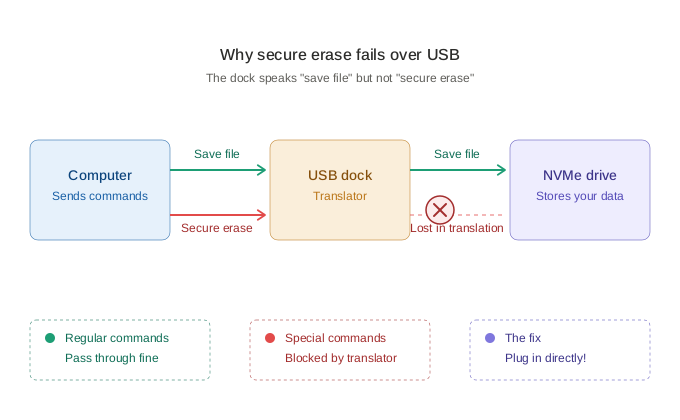
Next, let’s talk about the USB dock — basically a translator 🗣️. For instance, imagine you speak English, but your friend only speaks Dog 🐶. As a result, you need someone in the middle to translate “Woof woof!” into “Hello!”
So the USB dock takes the drive’s special language and translates it. Then your computer can understand it through the USB cable.
😢 So Why Can’t We Secure Erase NVMe USB Drives?
Now here’s the big secret! 🤫 The “magic erase” command works like a secret password 🔐 that ONLY the drive understands. Basically, it’s a special whisper that says: “Hey drive, please burn ALL your memories away!”
However, the USB translator? It doesn’t know the secret password! 😱
👨💼 Computer: “Please tell the drive to magic-erase!”
🔌 USB Dock: “Uhhh… I don’t know how to say that word. 🤷”
💾 Drive: “What? I didn’t hear anything! 🦗”
Basically, the USB translator only knows simple things like “save this file” or “open that file.” However, nobody taught it the super-special secret words for things like:
- 🔥 Secure Erase
- 🧊 Cryptographic Erase (a special NVMe magic spell)
- 🩺 Drive health checks (like SMART data)
- 🛠️ Firmware updates
⚡ Why Secure Erase NVMe USB is EXTRA Tricky
NVMe drives work like race cars 🏎️💨. Specifically, engineers designed them to plug DIRECTLY into the computer’s super-fast highway (called PCIe). So they speak a totally different language than old drives.
Meanwhile, most USB docks only know the OLD slow drives’ language. Therefore, when you put an NVMe race car into a USB dock, the dock says: “I can help you drive slow on the regular road, but I can’t help you do race car tricks!” 🚧
⚠️ But Wait — Can SATA Secure Erase Through USB Work?
Yes! Sometimes you CAN wipe SATA drives (the older toy boxes) through USB. However, here’s the scary part… 👻
It’s DANGEROUS! For example, here’s why:
- 😴 The drive might fall asleep! If the USB dock takes a nap during the wipe, the drive can get STUCK in a frozen state. Like a video game crash! 🎮💥
- 🧱 Brick-mode! If something goes wrong, your drive turns into a useless brick 🧱. Goodbye drive!
- 🤥 The dock might LIE! Some docks say “All done! ✅” but they didn’t actually do the magic erase. Your secrets are still there! 😱
- 🔌 Power blips through USB can scramble the drive’s brain forever.
✅ The Safe Way to Secure Erase NVMe USB Drives
So the safe way to magic-erase a drive? Plug it directly into the computer — no translator needed! 🎯
- 💻 Plug the SATA drive into a real SATA port inside a computer
- 🔧 Plug the NVMe drive into a real NVMe slot (M.2 slot) on a motherboard
- 🛡️ Then boot from a trusted erase tool like Parted Magic, which includes the Erase Disk utility for securely wiping both SATA and NVMe drives the right way
That way, the secret password reaches the drive directly. No translator confusion! 🎉 If you want to dig deeper into the technical side, the official NVMe specification and the NIST 800-88 media sanitization guidelines explain exactly how secure erase is supposed to work.
Want to learn more? Check out our guides on how to erase a disk with Parted Magic and secure erase best practices to make sure your data is gone for good.
🎀 The Big Takeaway
🧠 USB docks are friendly translators, but they don’t know all the words. The “magic erase” word is one of those missing words. So plug your drive in directly when you want to REALLY say goodbye to your data!
And finally, that’s it! 🌟 Now you know more about drives than most grown-ups. High five! ✋
💡 Remember: When in doubt, ask a grown-up tech helper. Erasing drives is a one-way trip — there’s no coming back! 🚂