
Parted Magic Opal Drive Manager: Unlock a Self-Encrypting Drive
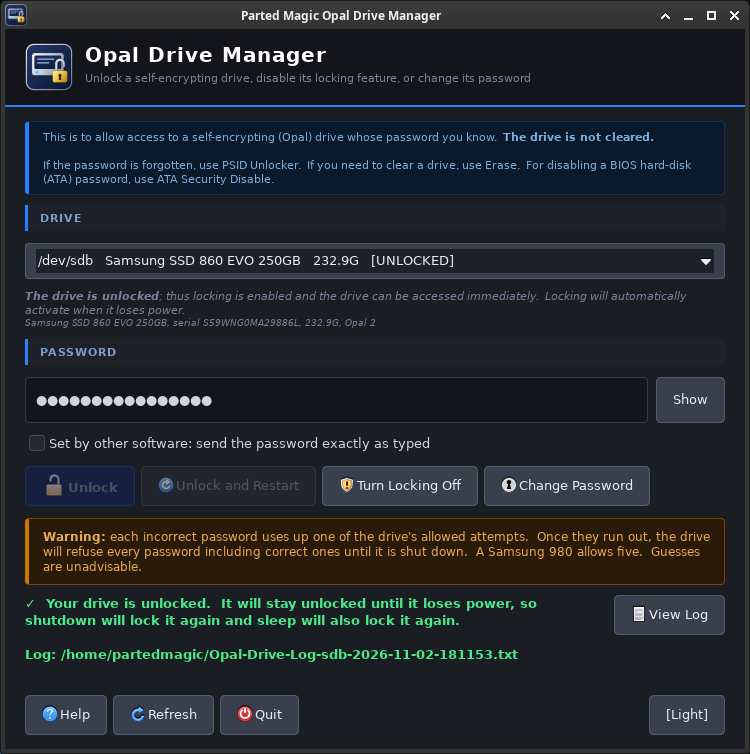
Parted Magic Opal Drive Manager is for a self-encrypting drive (TCG Opal SED) whose password you know. It shows whether the drive is locked or unlocked, and it can unlock the drive, turn its locking off, or change its password. It works through sedutil-cli, which comes with Parted Magic.
Opal Drive Manager erases nothing, and every change needs the drive’s password. If the password is lost, PSID Unlocker resets the drive with the 32-character PSID printed on its label, and that can lose everything on the drive. To erase a drive completely, use Erase. To remove an ATA password, such as a BIOS hard disk password or one left by a failed secure erase, use ATA Security Disable.
Opal Drive Manager is part of Parted Magic, in the Erase menu. Like the other Parted Magic tools, it runs from the same USB drive.
Opal Drive Manager Video Walkthrough
On This Page
- Wrong passwords
- Drive states
- The buttons
- Who can see the password
- The log
- In a terminal
- SATA drives and libata.allow_tpm
- When something goes wrong
Wrong Passwords
Each wrong password uses one of the drive’s allowed attempts. When they run out, the drive refuses every password, the right one included, until it is turned off. A Samsung 980 allows 5 wrong guesses, and other drives may allow a different number. Opal Drive Manager sends a password once per click and never tries it again by itself.
If the drive says it is locked out, shut the computer down, wait a few seconds and start it again. A restart is not enough: the drive has to lose power.
Drive States
- LOCKED: the drive’s data cannot be read until it is unlocked. Linux still shows the drive’s full size, but no partitions.
- PRE-BOOT AREA: the drive shows its pre-boot area in place of its partitions, so Linux sees no partitions. Unlock switches the drive back to its normal view.
- UNLOCKED: locking is set up and the drive can be used right away. It locks again when it loses power.
- NOT SET UP: the drive can lock itself, but locking was never turned on, so there is nothing to unlock.
- LOCKED OUT: the drive refused too many wrong passwords. Shut the computer down and start it again.
- ATA PASSWORD: an ATA password holds the drive locked, and the Opal commands cannot reach it until it is removed with ATA Security Disable.
- BLOCKED BY LINUX: Linux blocks security commands to this drive because
libata.allow_tpmis 0 and cannot be turned on. See SATA drives and libata.allow_tpm. - NOT A SED: the drive does not answer the security commands Opal Drive Manager uses.
- Other TCG types: Pyrite drives and TCG Enterprise drives (usually SAS) are shown with their type. Opal Drive Manager does not change them.
- BLOCK SID: the computer’s firmware sent Block SID at startup. On a drive with no owner password it stops one from being set. It does not affect a drive that already has an owner password, so it does not get in the way of Opal Drive Manager. Where the firmware allows it, Parted Magic TPM in the System menu can ask the firmware to stop sending Block SID from the next start.
The Buttons
- Unlock opens the drive so you can see, copy, clone, rescue or erase what is on it. It stays unlocked until the computer loses power: a shut down locks it again, and so does sleep.
- Unlock and Restart unlocks the drive and then restarts the computer. The drive keeps power through the restart, so it stays unlocked and your installed system can start from it. If Parted Magic starts again instead, choose the internal drive in the computer’s boot menu.
- Turn Locking Off unlocks the drive if it is locked, then turns locking off for good. The data stays. The drive never asks for a password again. The admin password still exists but does nothing while locking is off, and PSID Unlocker clears it. If other software set up extra locked areas on the drive (locking ranges 1 and up), this is refused, because turning locking off would erase them.
- Change Password changes the drive’s password. Type the current password in the main window, and the new one twice when asked. The admin password and the unlock password change together.
- Set by other software: sedutil and its pre-boot tool turn the password you type into a key before they send it to the drive, while some other software sends the password exactly as typed. Check this box only when another program set up the drive. A wrong entry counts as an attempt. A password sent as typed can be at most 32 characters long.
Who Can See the Password
sedutil-cli takes the password as a command-line argument, so while a sedutil-cli command runs, anyone with access to /proc on this computer can see it. The commands take about a second. The password is never logged, and it is gone once the command ends.
The Log
Each unlock, Turn Locking Off and password change writes a log to /home/partedmagic, or to the folder given with --log-dir, named Opal-Drive-Log-<drive>-YYYY-MM-DD-HHMMSS.txt. It holds:
- the computer’s maker and model
- the drive’s model and serial number
- the command that ran, with <password> in place of the password
- the output of sedutil-cli
- the drive’s state before and after the command
- the result
In a Terminal
pmagic_opal_manager                               # open the window
pmagic_opal_manager --list                        # every drive and its state
pmagic_opal_manager --unlock /dev/sdX             # unlock one drive; the password from the keyboard or standard input
pmagic_opal_manager --unlock /dev/sdX --as-typed  # the same, sending the password exactly as typed
pmagic_opal_manager --test                        # the window with made-up drives; no drive is touched
pmagic_opal_manager --log-dir DIR                 # write logs to DIR
pmagic_opal_manager --manual                      # the manual
--list works over SSH.
SATA Drives and libata.allow_tpm
Linux’s SATA driver blocks security commands unless the kernel line has libata.allow_tpm=1. Parted Magic’s UEFI boot menu includes it. When it is missing, Opal Drive Manager tries to turn it on at startup, as PSID Unlocker does, and the log says whether that worked. If it cannot, add libata.allow_tpm=1 to the kernel line, or start Parted Magic in UEFI mode. NVMe drives do not need it.
When Something Goes Wrong
A SATA self-encrypting drive shows as NOT A SED
Check in the firmware settings that the storage controller is set to AHCI mode rather than RAID mode.
A drive is not listed
USB disks are not listed. Connect the drive to a SATA or NVMe port inside the computer.
Your password was rejected by your drive
Check that Caps Lock is off and that the keyboard layout is right. Check whether other software set up the drive (see Set by other software). Remember that each wrong password uses one of the drive’s attempts.
The drive is unlocked but no partitions appear
Restart the computer instead of shutting it down. The drive keeps power and stays unlocked, and after the restart the system reads its partitions.
Get Parted Magic Opal Drive Manager
Parted Magic Opal Drive Manager comes with Parted Magic, along with Erase, NVMe Drive Manager, Parted Magic TPM and Rescue. One price covers unlimited disks and unlimited computers.