
Parted Magic TPM: See Your TPM and Clear It
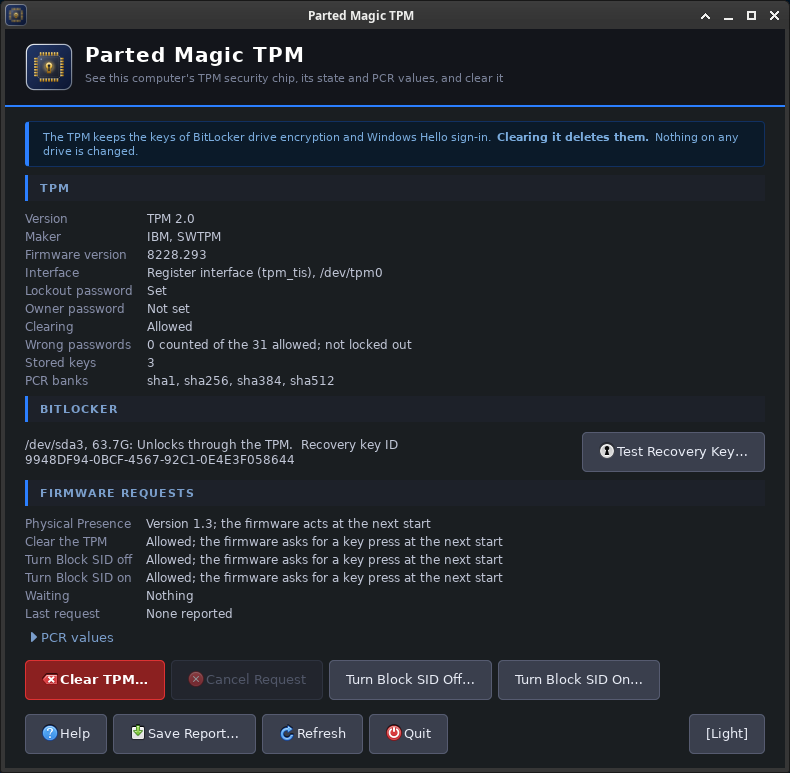
Parted Magic TPM shows a computer’s TPM: whether there is one, its version (1.2 or 2.0), its maker and firmware, whether an operating system has set it up, and its PCR values. It can clear the TPM, cancel a request waiting for the firmware, and turn Block SID off or on where the firmware allows it. Save Report puts all of it in a folder for support. Parted Magic TPM changes nothing on any drive.
A TPM (Trusted Platform Module) is a security chip in a PC, or a part of the firmware that works the same way. Windows keeps the keys for BitLocker drive encryption and Windows Hello sign-in in it, and some Linux systems use it to unlock their encrypted partitions.
Parted Magic TPM is part of Parted Magic. It is in the System menu. Like the other Parted Magic tools, it runs from the same USB drive.
Parted Magic TPM Video Walkthrough
On This Page
- What clearing does
- How the TPM is cleared
- The TPM section
- BitLocker
- Firmware requests
- PCR values
- Save Report and the log
- In a terminal
- When something goes wrong
What Clearing Does
Clearing the TPM removes every key the TPM made, and with them access to whatever those keys protected. Microsoft names the Windows Hello PIN and virtual smart cards among them. At its next start, Windows prepares the TPM again by itself.
After the TPM is cleared, BitLocker asks for its recovery key the first time Windows starts, and an encrypted drive does not open without the right key. So before it clears the TPM, Parted Magic TPM lists each BitLocker volume that unlocks through the TPM, shows the ID of its recovery key, and lets you test a recovery key you type. A Linux partition that unlocks through the TPM likewise needs its passphrase typed after the TPM is cleared.
Never clear the TPM of a computer owned by a company or a school without the permission of its IT department.
How the TPM Is Cleared
- Right away. If the TPM has no lockout password and clearing is not turned off, Parted Magic TPM clears it at once with tpm2_clear. A TPM that Windows has set up always has a lockout password, so on a Windows computer the TPM is cleared at the next start instead.
- At the next start. Parted Magic TPM asks the firmware, through a Physical Presence request, to clear the TPM the next time the computer starts. Restart the computer. Most firmware shows a message and asks you to press a key. If no key is pressed, or you decline, nothing is cleared.
Parted Magic TPM never tries a lockout password. One wrong lockout password can block every later attempt, the right one included, for as long as the TPM is set to wait: 24 hours on a TPM that Windows has set up.
The TPM Section
- Version: TPM 2.0, the current kind, or TPM 1.2 on older hardware.
- Maker: the maker code the TPM reports and its product name, such as IFX, SLB9670.
- Interface: the register interface (tpm_tis) or the command buffer (tpm_crb).
- Lockout password: Set or Not set. Every TPM that Windows set up has one, and only Windows knows it.
- Owner password: Set or Not set.
- Clearing: Allowed, or turned off in the TPM. When it is turned off, only the firmware can clear the TPM.
- Wrong passwords: how many wrong passwords the TPM has counted, and whether it is locked out.
- Stored keys: how many keys the TPM holds.
On a TPM 1.2, the section shows whether the TPM is enabled and active, and whether it has an owner.
BitLocker
Each BitLocker volume is listed with what it unlocks with:
- Unlocks through the TPM: after the TPM is cleared, enter the recovery key when Windows asks for it. The recovery key ID is the one Windows shows on its recovery screen, to help you find the right key.
- Suspended: BitLocker is paused on this volume, and it opens without the TPM.
- Does not use the TPM: clearing the TPM does not affect this volume.
Test Recovery Key opens the volume read-only with the recovery key you type, then closes it again. Nothing on the volume changes. A recovery key is 48 digits, in eight groups of six.
Firmware Requests
An operating system asks the firmware, through the Physical Presence Interface, to do something to the TPM at the next start. The firmware says which requests it accepts. Parted Magic TPM uses three:
- Clear the TPM, as above.
- Turn Block SID off and Turn Block SID on. The firmware of many Lenovo ThinkPads sends a Block SID command to self-encrypting drives at every start. On a drive with no owner password yet, it stops a new one from being set, and that can stop Erase from using the drive’s own encryption to erase it. Turning Block SID off lets Erase use it. On some firmware, Block SID stays off until you turn it on again.
Only one request can wait at a time. A second request replaces the first, and Parted Magic TPM asks before it does. Cancel Request removes the waiting request.
The restart that carries out a request can turn self-encrypting drives off and on, so a drive that was unlocked is locked again.
PCR Values
The TPM holds PCRs: measurements of what started the computer, such as the firmware, its settings and the boot programs. BitLocker checks some of them before it unlocks Windows. The values shown here are from the start of this Parted Magic session, so they can differ from what Windows sees, and they cannot tell you whether Windows will ask for its recovery key.
Save Report and the Log
Save Report makes a folder named TPM-Report-YYYY-MM-DD-HHMMSS with everything the window shows, the PCR values, what the TPM says about itself, the firmware’s request files and the firmware’s event log, decoded, with whether replaying the event log gives the same PCR values:
summary.txt: everything the window showspcr-values.txt: the PCR values in every banktpm2-getcap.txt: what the TPM reports about itself (TPM 2.0)ppi.txt: the firmware’s request fileseventlog.bin: the firmware’s event log, as the computer keeps iteventlog-entries.txt: every entry of the log, and whether replaying it gives the PCR valueseventlog.yaml: the log decoded by tpm2_eventlog, when it can read it
Each change (a clear, a request or a cancel) also writes a log to /home/partedmagic, named TPM-Log-YYYY-MM-DD-HHMMSS.txt.
In a Terminal
pmagic_tpm               # open the window
pmagic_tpm --list        # the TPM, its state, the firmware's requests and the BitLocker volumes
pmagic_tpm --save [DIR]  # write a report folder in DIR (default /home/partedmagic)
pmagic_tpm --manual      # the manual
--list works over SSH.
When Something Goes Wrong
No TPM was found
The computer has no TPM, or it is turned off in the firmware settings. Look for TPM, Security Chip, Intel PTT or AMD fTPM, usually under Security.
Clear TPM is not offered
The TPM has a lockout password and the firmware does not accept clear requests. Clear the TPM in the firmware settings instead.
The computer restarted without asking
Some firmware carries out requests without asking. Some needs a shut down and a fresh start instead of a restart; the Firmware Requests section says which.
The firmware asked although it said it would not
Some firmware, such as Microsoft Surface firmware, asks you to confirm a request even though it reports that it will not. Confirm it at the prompt.
The last request says declined at the prompt
The key was not pressed at the firmware’s prompt, so nothing happened. Make the request again and press the key the prompt names.
Get Parted Magic TPM
Parted Magic TPM comes with Parted Magic, along with Erase, Boot Repair, Secure Boot and VisParted. One price covers unlimited disks and unlimited computers.