
Parted Magic Boot Repair: Fix Windows and Linux That Won’t Start
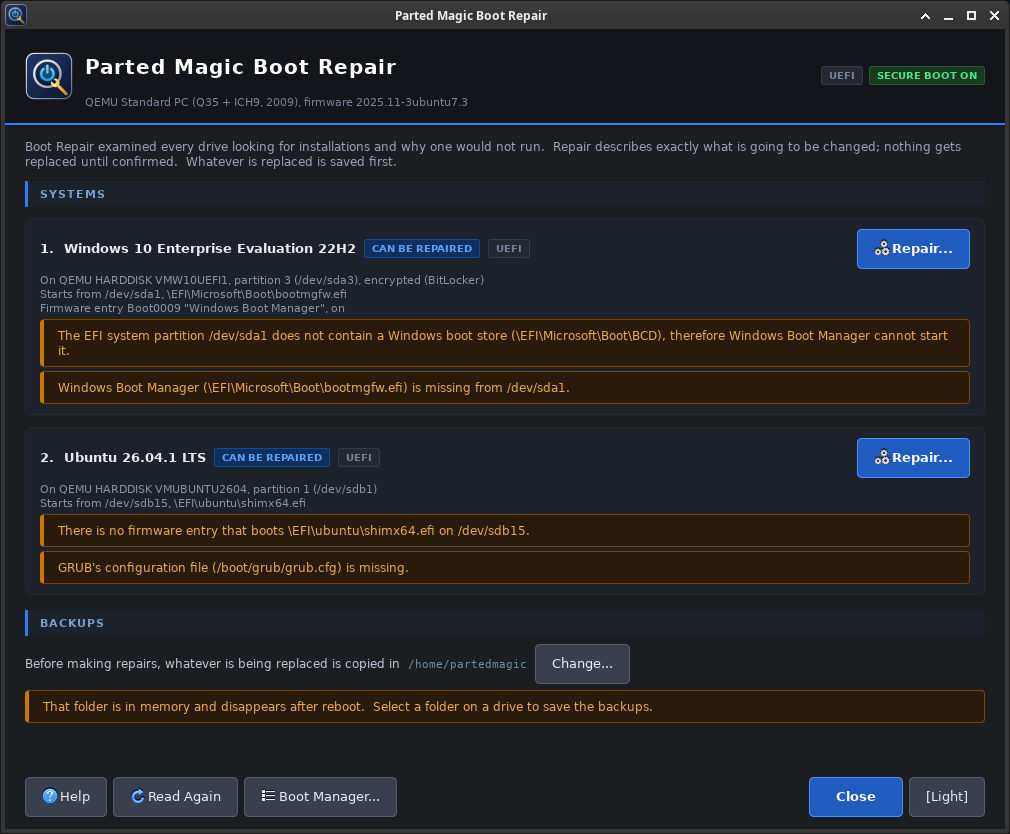
Parted Magic Boot Repair checks every drive in a computer, finds each Windows and Linux system, and looks for the common reasons one will not start. It shows each repair before it makes it, writes nothing until you confirm, and saves a copy of everything it replaces.
Boot Repair is part of Parted Magic. It is on the Desktop and in the System menu. Like the other Parted Magic tools, it runs from the same USB drive, so it works when nothing on the computer will start.
Boot Repair Video Walkthrough
On This Page
- What Boot Repair looks for
- How each system is repaired
- What it cannot repair
- Backups and the log
- In a terminal
- When something goes wrong
- Boot Repair FAQ
What Boot Repair Looks For
For each system it finds, Boot Repair checks for these problems:
- The firmware has no boot entry for it, or its entry is turned off.
- Its boot loader is missing from the EFI system partition.
- Windows was moved or cloned to another partition, but its boot store (BCD) still names the old one. Windows then stops with error 0xc000000e.
- Windows’ boot store is missing or damaged.
- GRUB looks for a filesystem that is not there and stops at the
grub>prompt, or its menu is missing. - There is no fallback start file for firmware that ignores its boot list.
- On a BIOS computer, the MBR boot code is missing or wrong, the partition that holds bootmgr is not marked active, or that partition’s boot sector cannot start bootmgr.
Each problem comes with the repair for it. Click Repair on a system to see its plan: every change, listed before it is made. Nothing is written until you confirm the plan. If Boot Repair cannot fix a problem, it says why.
How Each System Is Repaired
Windows on a UEFI computer
Boot Repair copies the boot files from Windows’ own \Windows\Boot folder to the EFI system partition, as Windows’ bcdboot does. If the boot store still names old partitions, Boot Repair corrects it in place and changes only the partition and disk IDs in it. A missing or damaged boot store is replaced with a new one built from Windows’ own BCD template. The firmware entry gets the same information Windows records about itself.
A new boot store is not linked to Windows’ recovery environment. To link them again, run reagentc /enable in Windows.
If Windows is on a disk that was converted from MBR to GPT, which VisParted can do, and the disk now has an EFI system partition, Boot Repair sets Windows up to start through UEFI. It copies the boot files, builds the boot store and makes the firmware entry.
Linux
Boot Repair mounts the installed system and runs that system’s own tools inside it:
- Ubuntu, Mint and Debian: grub-install and update-grub
- openSUSE: shim-install and grub2-mkconfig
- Fedora, RHEL, Rocky and AlmaLinux: grub2-mkconfig, and dnf to replace missing shim and GRUB files, which needs a network connection
- Arch: grub-install and grub-mkconfig, or bootctl
Secure Boot keeps working, because the repair uses the system’s own signed shim and GRUB. Parted Magic never installs its own GRUB on another system. An encrypted (LUKS) system is opened with its passphrase first.
On Fedora, RHEL, Rocky, AlmaLinux and openSUSE, the small grub.cfg on the EFI system partition that points GRUB at /boot is made the way their installers make it. A system installed with only the fallback start file, such as some cloud images, stays that way.
Windows on a BIOS computer
Boot Repair writes Windows’ MBR boot code with ms-sys and leaves the partition table alone. It marks the partition that holds bootmgr active. A boot store that names old places is changed in place: the disk signature and the partition’s byte offset. A missing or damaged boot store is rebuilt from Windows’ BCD template, as bcdboot does, by copying bootmgr and the files from \Windows\Boot\PCAT to the System Reserved partition if it is active, or else to Windows’ own partition. If the boot sector of the partition that holds bootmgr cannot start it, as after a format, ms-sys writes Windows’ NTFS boot code into that sector.
Windows encrypted with BitLocker
Boot Repair reads a BitLocker volume through dislocker and never writes to it. If its protection is suspended, because BitLocker is paused or Windows’ device encryption is not turned on yet, Boot Repair opens it by itself. Otherwise, enter its 48-digit recovery key or its password with the Unlock button under Encrypted Volumes. The key or password is kept in memory only. Boot Repair then repairs that Windows like any other.
The firmware entry
Boot Repair adds the system’s entry to the firmware’s boot list with the same code as Parted Magic Boot Manager, and reads it back to check it. To change the order of the list, use Boot Manager.
What It Cannot Repair
- Two drives with the same IDs. After a clone, both drives can have the same disk and partition IDs, so the firmware and Windows cannot tell them apart. Remove one drive and repair the other.
- No EFI system partition. A system that starts through UEFI needs one. VisParted can make it: FAT32, 260 MiB or more, with its type set to EFI System.
- Secure Boot refuses the boot loader. Parted Magic Secure Boot can add Microsoft’s certificates. An unsigned boot loader starts only with Secure Boot turned off.
- BitLocker without its key. While Windows is locked, its files cannot be read, so its boot files cannot be copied and a new boot store cannot be built. Boot Repair still corrects a boot store that names old places and makes the firmware entry.
- Other systems. Boot Repair lists other operating systems with what it could find out about them, but it does not repair them.
Backups and the Log
Before it writes anything, Boot Repair copies everything it will overwrite to a folder named BootRepair-Backup-<computer>-<date>, inside the backup folder shown in the window. That is the first drive mounted for writing, or else Parted Magic’s home folder. The backup holds:
boot-list/: the firmware’s boot list, as a Boot Manager backupesp/: files from the EFI system partitionsystem/: files from a BIOS Windows’ system partitionmbr-<disk>.bin: the first sector of a disk before its boot code changedpbr-<part>.bin: the first 16 sectors of a partition before its boot code changedplan.txt: the plan as it was shown
Parted Magic’s home folder is in memory and is gone after a restart, so choose a folder on a drive for the backups.
Each repair also writes a log to /home/partedmagic, named BootRepair-Log-YYYY-MM-DD-HHMM.txt. It lists the systems Boot Repair found, the firmware’s boot list before the repair, every action, the output of each tool it ran in a system, and what it read back.
In a Terminal
pmagic_bootrepair                   # open the window
pmagic_bootrepair --list            # the systems, their problems and the repair for each
pmagic_bootrepair --repair N        # repair system N from --list: prints the plan, asks for yes
pmagic_bootrepair --repair N --yes  # the same without the question, for scripts
pmagic_bootrepair --manual          # the manual
--list works over SSH. In a terminal, --list and --repair ask for the passphrase of each LUKS volume, and for the recovery key or password of each BitLocker volume that does not open by itself. Press Enter to skip one.
When Something Goes Wrong
Windows’ partition cannot be written
Windows was not shut down all the way, because of Fast Startup or hibernation, so its partition is not safe to write. If Windows starts, use Restart instead of Shut down, and start Parted Magic from the boot menu.
A Windows file could not be read because Windows keeps it compressed
If the Windows partition is mounted with ntfs-3g, which Parted Magic Mount uses, unmount it and run the repair again.
A Fedora, RHEL, Rocky or AlmaLinux repair stops at dnf
The system’s shim and GRUB files are missing and have to be downloaded. Connect Parted Magic to the network and run the repair again.
The system still does not start
Check in Parted Magic Boot Manager that the system’s entry is first in the boot list and turned on. Some firmware ignores its boot list and looks for the fallback start file instead.
Boot Repair FAQ
Does it work with Secure Boot on?
Yes. For Linux it uses the system’s own signed shim and GRUB, and for Windows it copies Windows’ own boot files.
Does it change my partitions?
It does not create, move or resize partitions. It writes boot files and boot code, the Windows boot store, the active flag on a BIOS computer, and the firmware entry. To make an EFI system partition, use VisParted.
Does it need the internet?
Only to repair Fedora, RHEL, Rocky or AlmaLinux when their shim and GRUB files are missing. Everything else comes from the installed system or from Parted Magic.
Get Parted Magic Boot Repair
Parted Magic Boot Repair comes with Parted Magic, along with VisParted, Clone, Rescue and Secure Erase. One price covers unlimited disks and unlimited computers.