Parted Magic Clone: Disk and Partition Cloning
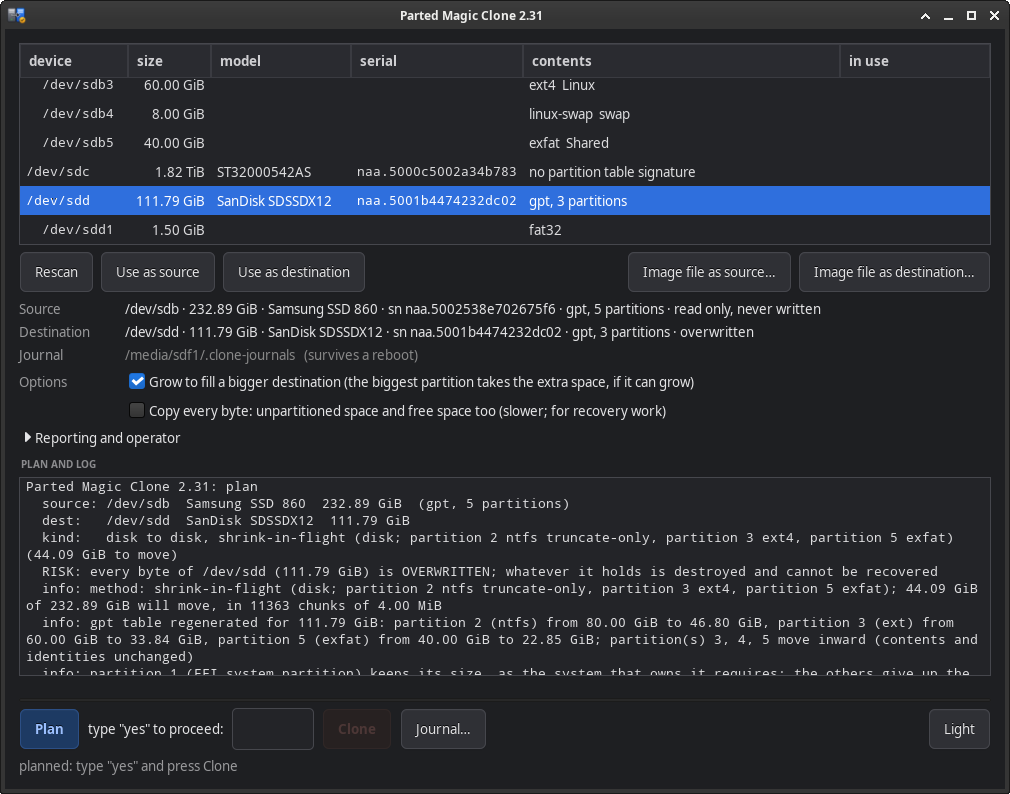
Clone will make a copy of a disk, a partition, or an image of either. In each case it creates a certificate for the copy which verifies its correctness. You select your source and destination. Clone then decides on what needs to be done, asks if you wish to proceed (you simply enter yes) and completes by providing a final sealed certificate: the identity of the two devices involved, message digests of all the pieces, a Merkle root over all the pieces, a mapping of areas where data was unreadable, and timing information.
It has been built into Parted Magic, and can run from the same USB drive as all other programs.
On This Page
- The source is never written
- What it copies, and what it leaves out
- Images: raw, compressed, split
- A different-sized disk
- When sectors will not read
- Verification and certificates
- When the power fails: the journal and resume
- Window, terminal and command line
- Command-line reference
- Clone filesystem support
- What Clone refuses
- What Clone will not do
- Fleet reporting
- Clone FAQ
The Source Is Never Written
The source remains read-only from start to finish. All the repairs (rebuilding a file system using its backup structure information, shrinking or growing it to fit the destination, replaying a dirty ext journal) are done on the copy.
This defines how everything is designed. An unclean ext3 volume is recovered into an overlay instead of being fixed in place. A shrink operation is calculated based off of the read-only original and written out at the smaller size, instead of being copied and then cut down. Similarly, an interrupted operation only costs you a restart, because regardless of what occurred while running, the source disk is unchanged.
Clone is not a recovery method. The drive needs recovering if its reads are consistently failing, and Clone tells you this and stops. If your drives need recovering, there’s also ddrescue and Parted Magic Rescue in Parted Magic.
What It Copies, and What It Leaves Out
Clone reads the allocation state from the filesystem itself (cluster maps for FAT12/16/32, exFAT and NTFS; block bitmaps for ext2/3/4; XFS; and the partition table with its logical chain) and clones only the metadata and the allocated data. Free space in each filesystem is neither read nor written during cloning.
Each map gets compared to the filesystem’s own counters prior to using it. If a map differs from the superblock by only 1 block, then the area is cloned entirely instead of just being mapped. The plan also states why this was done. btrfs is intentionally identified by name and cloned in its entirety, because two maps were written for btrfs, and both created volumes that the kernel would not mount, the second even though btrfs check said the copy was clean. Cloning slowly is much better than producing a copy that will not mount. Windows BitLocker volumes are identified, named and cloned in their entirety, since they are encrypted and therefore there can be no readable information stating what portions of the volume are in use. They cannot be cloned smaller or larger than their original size, and they unlock with the exact same recovery key as the original.
Unpartitioned space isn’t replicated either, except for as much as it needs to be. The partition table, the first 64 MiB before the first partition (where boot loaders live), any gap of up to 16 MiB, the last megabyte on the disk and any partition which Clone does not know about will be duplicated identically. Any larger unpartitioned spaces (or gaps) will be completely ignored by Clone, and the plan and the certificate will indicate exactly how much was skipped and where. On a disk target, these areas retain their prior content and should therefore be wiped clean before cloning if this is important; in an image file they become holes.
Clonezilla follows this same model, and it makes a significant difference. On the test bench, 198 of the 235 GiB being moved for one image was unpartitioned space; the same operation now moves 37.94 GiB. When you need a byte-by-byte copy anyway (a forensic copy, or a layout you would rather not have interpreted), use --full-range, or check the Copy every byte box in the window, and every sector is copied, including the gaps.
The dirty ext journal, replayed into the copy
An ext3 or ext4 volume that had to be shut down without being cleaned up (a machine that lost power, or a snapshot taken of a volume while it was still mounted) has journal entries for all of the transactions that have been committed by the filesystem but not yet actually applied by it. All of the resizers refuse volumes that were not cleanly closed out until e2fsck has replayed them, which cannot happen on either a read-only source or an image of that source.
Clone replays the journal itself into an overlay on the read-only original file system, the same way the kernel and e2fsck do (descriptor, data and commit blocks in order, revokes honored, escaped blocks restored). When Clone accesses this volume to perform the map, resize and copy operations, what it is accessing is the recovered file system. Upon completion of these actions, the copy is completed without any need to recover the file system, and the journal is shown to be empty. This allows you to grow or shrink the file system as desired. The plan indicates that the replay happened and how many blocks it touched, and the certificate records it. No writes have occurred to the original source. If the journal is untrusted (external, fast-commit or damaged), Clone simply leaves it alone, the plan documents why, and the volume is copied exactly as it exists at present.
Images: Raw, Compressed, Split
Images are raw images: the device’s exact bytes, sparse where no data was copied. This is also how dd writes an image and how losetup mounts one, and virtually all tools can read an image at any time. The image has no header, no container, and no version number, therefore there is nothing to convert.
As for compression, this is turned on by default and does not affect any of the above. Compressed images are simply zstd files: frames, one frame per 4 MiB of the raw image, in order. Decompressed, they are identical to the original raw image.
zstdcat name.img.zst | dd of=/dev/sdX # restore with the system's own toolsNone of the information within the image is related to Clone. Compression occurs across each core available, and space that is empty compresses to almost nothing. On FAT32 (most removable storage such as flash drives, and the boot stick), no file can reach 4 GiB in size. Therefore a larger image is divided into multiple smaller files named the way split -d -a 3 names them. cat name.img.zst.* | zstdcat will restore the entire collection regardless of location, and any single part can be named as the source for the entire collection.
Either type of image will work fine as a source, and so will raw images written by other tools.
Reading an image without unpacking it
A frame table (chunk location in the compressed stream) allows Clone to read any portion of the image without decompressing everything before it, allows an interrupted clone to resume, and allows verification of each chunk, with repair as necessary. This table is located in the certificate next to the image, and is duplicated inside the image itself, in a frame zstdcat does not recognize, which is written immediately upon completion of the copy.
This duplicate is important if the certificate has gone missing. Prior to its existence, determining what was on a 235 GiB image required a complete decompression: approximately 22 minutes, plus the disk space required to hold the result. Images created using other tools, or by older versions that did not include this feature, continue to be processed via the original method: one scan across the entire file, slower than the new method but just as accurate.
A Different-Sized Disk
FAT, exFAT, NTFS and ext file systems can be expanded or shrunk as they are copied. All changes made during this process are computed against the read-only source, and the entire resized file system is then created on the destination. No “copy-and-then-resize” second step will occur; therefore, there is never an instance when the copy is temporarily incorrect. A Windows NTFS copy that has been expanded or shrunk will be marked “dirty,” which means that on its first startup, Windows will check the file system once using chkdsk, and the plan says so.
Onto a smaller disk
The partition table will also need to be rebuilt for the new disk size. Partitions with a file system that can be shrunk will give up a portion of the difference based upon how much free space they had prior to the shrinking operation. For example, a nearly full file system would give up very little, and nearly empty file systems would give up the largest amount of space. None of these file systems will be shrunk down to their absolute minimum. The EFI system partition, along with a Windows recovery partition, will maintain its current size, because Windows requires at least 200 MB for the first (300 MB on 4K-native drives) and 250 MB of free space in the second to update its recovery tools. All partitions placed after a shrunken partition, including all data and identities contained within those partitions, will remain intact and move inward accordingly. The boot sector associated with each of these partitions will also be updated to reflect the new location from where it begins.
On a GPT disk there are no such restrictions on relocating an NTFS partition. However, on an MBR disk, Windows’ boot records refer to each partition by its location relative to the beginning of the disk (offset), so moving a Windows system volume (a root-level Windows directory, bootmgr, or a Boot directory) will result in an operating system that fails to boot. Therefore, the plan does not allow this action, for the reasons stated above. Relocating any data volume is permissible, and logical partitions within an extended partition are never relocated.
The shrink operation on ext2/3/4 is complete, not approximate: whole block groups are removed, the used inodes stored in the removed block groups are placed into unused slots in the surviving block groups, and all directory entries referencing them are updated. All data extents are fully relocated, together and contiguously, beneath the point that was established for the cut. Any extended attribute (xattr) blocks are also relocated, with their checksums recalculated, and every ext4 metadata checksum is recomputed. If fragmented free space leaves no area big enough for an extent to fit entirely, the plan simply refuses with the sizes instead of attempting to split it; e4defrag or a larger target gets past that.
Onto a bigger disk
In general, the common case where a small older drive is copied onto a larger newer drive grows similarly as it copies, so the copy does not end up having excess unused space to correct by using a second tool, and the certificate covers the final bytes.
The new GPT is generated based upon the new size of the disk. This includes the backup header and entries at the actual end of the disk. The last usable logical block address (LBA) has been moved outward. Both CRC values are recalculated. The protective MBR is also expanded. It is simply the largest partition which will be resized, when it holds a file system Clone can grow. However, in cases where it does not (a BitLocker volume, LUKS, btrfs, anything unrecognized), the resize will not occur, since this additional free space would otherwise be assigned to a small neighboring partition where it could not be used: for example, a recovery partition immediately behind an encrypted Windows partition, or a /boot partition preceding an encrypted root partition on a Linux system. On a GPT disk, partitions located after the resized partition (a recovery partition following a Windows C:, a data partition following a Linux root partition) will all migrate toward the end of the disk by an identical amount (1 MiB aligned) while maintaining the exact same sizes, contents and GUIDs. They will remain accessible to Windows and EFI firmware due to their association via GUID. The boot sector start fields for those partitions will be updated, as well as a BitLocker volume’s header.
On an MBR formatted disk, partitions are never moved, because of the same offset issue. Therefore, the largest partition can grow only if it is also the last primary partition, and the plan says so. If no partition can grow, then the current configuration will be preserved, and the stale backup header will be cleared. The plan will detail how much of the area remains unallocated and why. If there is a volume that cannot be grown due to either being dirty, damaged, or containing features that are unsupported by the product, it will be cloned as it exists at the time, along with the reason within the plan. By default, growing is enabled, so a person restoring an image onto a room full of machines doesn’t have to go back through all those systems to resize their respective partition after the restore; --no-grow, or unchecking Grow to fill a bigger destination in the window, preserves the unallocated space.
When Sectors Will Not Read
A healthy disk may have an occasional bad sector. When a chunk fails during a copy operation, it will be retried, and then each of its sectors will be read one at a time to preserve everything possible. Any sectors which cannot be read at all will not be copied to the target disk. Those sectors will instead be filled with zeros on the target disk and will be recorded in the skip map within the certificate. If there have been more than 64 error events or 4 MiB of unreadable data, the current job will stop and tell you why, because the source drive requires rescuing. Either way, the original source remains unchanged.
The damage report
Each area where data was replaced with zeros is mapped, using the destination’s own structures, to the corresponding file, directory or metadata it landed in: FAT and exFAT through the directory tree, with long names; NTFS through the Master File Table, with paths built from $FILE_NAME parents (alternate streams and directory indexes named as such); and ext through inodes, with paths generated by traversing the directory hierarchy. If a structure is damaged beyond being able to traverse it, that fact is explicitly noted. The findings are stored in the certificate as well as displayed on your monitor, and clone damage CERT.json recomputes them later upon request.
The report provides information about which files were impacted, rather than merely how many bytes of data were lost.
Repairs from redundancy
File systems keep two copies of each component they cannot survive without: a second file allocation table (FAT) and, on FAT32, a backup boot sector; a backup boot region for exFAT; a backup boot sector and an MFT mirror ($MFTMirr) for NTFS; duplicate superblocks and descriptor tables for ext2/ext3/ext4; and a backup header and entries for a GPT.
If a primary structure falls into a block of zeros and its twin is intact, then the bytes from the twin will repair the primary. If there is a twin which is normally out of date, then instead of copying the bytes from the twin, the bytes are rebuilt using whatever information survives in the copy. For example: FAT32’s FSInfo is rebuilt from the FAT, ext’s superblock is rebuilt with its free counts summed from the group descriptors, ext’s descriptor table is rebuilt with its counts and checksums recalculated from the volume’s bitmaps, and finally, the GPT header is rebuilt with its LBA values swapped and a new CRC calculated. Repairs take place after the copy operation and before verification, so the certificate’s digests describe the repaired bytes, and verify --deep still passes. All of these repairs are documented with information about how the bytes were obtained. Any portion of a file system which does not contain a good twin will be left filled with zeros and will be named in the damage report.
Verification and Certificates
Verification always occurs. Once the copy operation has completed, the data at the destination is read back (with O_DIRECT where the device allows, so it comes from the medium, not the cache) and verified against the digests generated during the copying operation, chunk by chunk. A certificate will never be created for a copy that did not complete this verification step.
Each certificate contains the identities of both devices, each chunk’s digest, a Merkle root over all chunks, the skip map, a list of repair operations performed, what was skipped as unpartitioned space, and timing information. The certificate itself is identified by hashing the entire certificate’s content; thus no certificate may be modified without creating a new certificate.
clone verify cert.json            # prove the certificate is intact
clone verify cert.json --deep     # read the copy back and compare it
For future rechecks of whether the filesystem was altered since it was certified, please note that a filesystem may still be written to while it is mounted read-only. For example, ext4 can replay its journal and process orphaned inode entries on a read-only mount. Any write made to the filesystem while mounted read-only would cause verify --deep to correctly identify that the copy had been altered subsequent to the time of certification. Please run verify --deep prior to your initial mount of the filesystem when the certificate matters.
Chunks that nothing lands in (i.e., they do not have data placed into them) are neither built, hashed nor compressed. During verification, the read-back uses the previously established digest for those chunks rather than reading them once again. On the bench, that took one image job’s copy from 1,972 seconds to 965, and its verification pass from 943 seconds to 15.
When the Power Fails: The Journal and Resume
Every job has a journal, and that includes a chunk bitmap, digests, and a skip record; thus, if a clone operation is interrupted, due to a power failure for example, it will resume exactly where it left off, as long as the journal remains intact.
Parted Magic runs from RAM, and thus follows the same rules for placing the journal as VisParted does: a location that can be shown to remain persistent across a reboot (a real block device with an on-disk filesystem, following a loop device to its backing file), that is writable, that is not on a disk the job touches, and that has sufficient free space available. Removable media come first, because on a rescue system that is the boot stick.
Boot sticks are almost always FAT32 filesystems, which do not maintain their own journals. Therefore, Clone’s journal is written in a manner such that it will persist across a power outage there. Each journal file is created at full size before the first chunk moves. The bitmap and the digests are only ever rewritten in place, so while the job is running, neither the directory entries nor the FAT chains of the journal’s files will ever change, and no renaming of files occurs. The event log is strictly append-only, each record is flushed to disk immediately, and if a partial record exists when the process terminates, it is treated as though it was never written. Upon resuming a previously interrupted clone operation, a chunk will only be considered trustworthy when its bit is set in the bitmap and its digest is present, and the digest is saved first; thus, whatever is lost, the chunk will be redone rather than wrongly trusted as correct.
The window’s Journal… button (or J in the terminal version) will tell you where your journal files are kept and show which places qualify. It lets you choose an unmounted partition and mount it, and then it will look for any interrupted copy in the chosen location and offer to complete it. Both versions run this check at startup; therefore, if someone loses power and has to reboot, they are asked about finishing the interrupted copy, rather than having to manually start some sort of command. If no place on the computer qualifies, then the journal will be held in memory, and the plan will list this as a risk instead of refusing, because the source is untouched and a lost journal only costs a restart.
A job that is still running is never offered for resume.
Window, Terminal and Command Line
There is a window like VisParted’s, a full-screen terminal version of the program for machines without graphics, and a command line. The three have the same method of operation: select the source, select the destination, read the plan, type yes once, watch, and read the certificate line.
All three display the same messages: the same refusals, the same progress lines, the same wording. If you run clone with no parameters, it will bring up the window on a desktop, or run the terminal version in a terminal.
Clone Command-Line Reference
clone                                  # window on a desktop, terminal face on a terminal
clone gui | tui [--resume DIR]         # one or the other, on request

clone probe TARGET                     # identity, size, sector size, table
clone plan SOURCE DEST [--out plan.json]   # print the plan, write nothing
clone clone SOURCE DEST                # plan, one typed yes, copy, verify, certify
clone apply PLAN.json [--commit]       # run a saved plan
clone resume [--journal DIR]           # finish an interrupted job

clone verify CERT.json [--deep]        # prove the certificate, or re-read the copy
clone damage CERT.json [--dest DEVICE] # name what the zero-filled ranges landed in

clone report probe                     # check the PM report server
clone report send CERT...              # send certificates
clone report sync [DIR]                # send every certificate not yet countersigned

clone manual                           # the built-in manual
The destination can be a block device or an image file path; an image is created sparse and mounts with losetup like any raw image. apply without --commit stops after the plan and precondition checks, having written nothing. resume with no --journal lists the interrupted jobs it can find, wherever journals are kept on this machine.
Useful options: --full-range copies every byte, including the gaps; --no-grow leaves the extra space on a bigger destination alone; --journals BASE sets where journals go for one run, and --journal DIR names one job’s own directory; --server and --token set a report server, and --no-report keeps a job local.
Clone Filesystem Support
A “Used-block map” means only the used blocks are read and written. Everything else will be copied accurately either way: a file system that has no map will be copied across its whole range, which takes longer, but it will be completely accurate.
| Filesystem | Used-block map | Shrink in flight | Grow in flight | Damage report |
|---|---|---|---|---|
| FAT12 / FAT16 / FAT32 | ✓ | ✓ | ✓ | ✓ |
| exFAT | ✓ | ✓ | ✓ | ✓ |
| NTFS | ✓ | ✓ | ✓ | ✓ |
| ext2 / ext3 / ext4 | ✓ | ✓ | ✓ | ✓ |
| XFS | ✓ | No | No | No |
| btrfs | full range, on purpose | No | No | No |
| BitLocker | full range, it is encrypted | No | No | No |
| linux-swap | No | No | No | No |
| anything unrecognized | full range | No | No | No |
Natively read and written partition tables: GPT, and MBR with its entire extended-partition chain.
What Clone Refuses
| Refusal | Why |
|---|---|
| A mounted source or destination | A mounted source is changing while it is copied. |
| An active swap partition | The kernel is writing to it. |
| Held by device-mapper: an open LUKS container, an LVM physical volume with its volumes active, or a RAID member | Just as much in use, though the mount table names only the mapping. |
| Cloning a device onto itself, onto its own disk, or onto one of its own partitions | That would destroy the data being copied. |
| Mixed kinds: a disk onto a partition, or the reverse | They are not the same kind of object. |
| A destination smaller than the source when no in-flight shrink exists for what it carries | The refusal states how much is actually in use. |
| A dirty or structurally damaged volume offered for shrinking | Cross-links, chains into free space, lost clusters, unclean flags and checksum mismatches are each refused, with the reason. A structure that cannot be read is refused too, and never crashes the program. |
| A shrink that would push a FAT volume below its type’s minimum cluster count | That would change the filesystem type without saying so. |
| A source past the read-error threshold | That drive needs rescuing, not cloning. |
| A resume whose source has changed, or whose source or destination is mounted | It would no longer be finishing the same job. |
When any of its partitions is in use, the entire disk will be counted as being in use. A partition is only counted for itself; therefore, a mounted partition will not prevent the cloning of a partition located next to it.
Mixing 512-byte and 4Kn drives
Enterprise disks pulled from arrays are often 4Kn (4096-byte logical sectors), whereas the disk residing alongside them is 512. Replicating a partition table across that boundary needs a geometry rewrite, which this version doesn’t do. Thus, a whole-disk clone between the two is refused.
A partition copy presents a separate scenario, and the outcome will depend on the file system. Because ext2/3/4 and btrfs do not record the sector size, those partitions can be cloned across, with a note in the plan. Since NTFS, FAT, exFAT and XFS do record the sector size, these are refused by name, rather than being copied into a file system that could not be mounted.
What Clone Will Not Do
- It is not a rescue tool. A drive past the read-error threshold is refused on purpose.
- XFS, btrfs and BitLocker volumes are copied but not resized in flight. btrfs is copied over its full range on purpose, and BitLocker because it is encrypted.
- Boot repointing is not built, on purpose: Clone never moves partitions on an MBR disk, so nothing needs repointing.
- Mass deployment, image encryption and built-in network targets are not built. Mount the share and pick the folder, or use Clonezilla for mass deployment and encrypted images.
- Mac filesystems are not mapped. They copy over their full range like anything else unrecognized.
- ext volumes using
ea_inode,inline_data,meta_bg,bigalloc, MMP orsparse_super2are refused for resizing, by name.
Fleet Reporting
The certificate is what matters, and the PM Report Server is how it will get off of the machine. If you have set a server (using --server, the PARTED_MAGIC_CLONE_SERVER variable, the server typed into the window or the terminal version, which is saved and shared with Erase and VisParted, or the pmreport= boot parameter that you are already using in your fleet for reporting on erases), then the plan names it, and when a certified job writes out its certificate, it immediately sends it.
Before the server accepts a report, it will recompute its content-addressed report ID, then store it as the bytes were received, and it will also countersign those bytes. The countersignature will be stored alongside the certificate as proof of receipt. A certificate that has been altered after it was sealed is refused before it is sent.
If a report did not go through, no alteration is made to the result of the job. The copy is verified and the certificate written before anything is sent, the reason is displayed, and clone report send or clone report sync will deliver it later. Authentication is a token from --token, the environment, or the same pmreport_token= boot parameter the erase clients read; a token is never written into a plan or a journal. --no-report keeps a job entirely local.
Clone FAQ
Can it ever write to my source disk?
No. The source is opened read-only, and Clone writes all corrections to the copy, including replaying a dirty ext journal, which is done into an overlay rather than directly onto the disk.
What if the power goes out mid-copy?
Simply reboot and run Clone again. Clone will automatically find the interrupted copying operation and offer you the opportunity to complete it, starting from the last chunk whose digest was saved rather than from the beginning. If the journal itself was lost, you restart the copy, and because the source is untouched, there is no chance of losing any data by restarting the copy process; only time is lost.
Do I need Clone to restore one of its images?
No. A compressed image is an ordinary zstd file, and zstdcat image.img.zst | dd of=/dev/sdX restores it on any machine with the system’s own tools. Clone adds verification, resume and a certificate, but you never need Clone to read your own data.
Can I clone a bigger disk onto a smaller one?
Yes, if the data will fit on the target drive and the file systems used on the source disk are ones Clone can shrink. Clone will generate a new partition table for the destination drive, shrink the partitions in proportion to their free space, and then move all subsequent partitions inward. If there isn’t enough room to hold all the data from the source disk, the refusal will tell you exactly how much is actually in use.
Does it need the internet or an account?
No. Clone is completely self-contained and works without any online connectivity. Fleet reporting is strictly optional, and when it is enabled, the evidence will go directly to a report server which you host yourself on your own network.
Get Parted Magic Clone
Clone ships inside Parted Magic, along with VisParted and Secure Erase. One license covers unlimited drives and unlimited machines, with no per-seat or per-drive fees.